Important Note: The links and information presented here are sourced from the official website of the Revenue Department, Government of Gujarat — https://anyror.gujarat.gov.in/.
AnyRoR is an official online land record portal launched by the Government of Gujarat. It enables citizens to access detailed land record information — including anyror gujarat 7/12 extracts, ownership details, survey numbers, land mutation (change) history, and agriculture data — directly from their homes.
This service is especially helpful for farmers, landowners, and buyers, saving valuable time and effort by providing transparent, online access to revenue records.
AnyRoR Gujarat Portal Overview
| Feature / Section | Details |
| Portal Name | AnyRoR Gujarat (Any Record of Rights) |
| Official Website | anyror.gujarat.gov.in |
| Objective | Provide online access to land records (rural & urban) |
| Documents Available | 7/12 Utara, 8A Khata, VF6, Mutation (135-D), Property Card, Unit Property Card |
| Services Offered | View land record (જમીન રેકોર્ડ જોવા માટે) (rural/urban), Digitally signed RoR download, Property search, E-Chavdi |
| Coverage | Both rural villages & urban cities in Gujarat |
| Language Support | Gujarati & English |
| Validity | Digitally signed PDFs are legally valid in courts, banks & सरकारी कार्यालय (government offices) |
| Users | Farmers, landowners, property buyers, citizens of Gujarat |
| Access Mode | 24×7 online through computer or mobile |
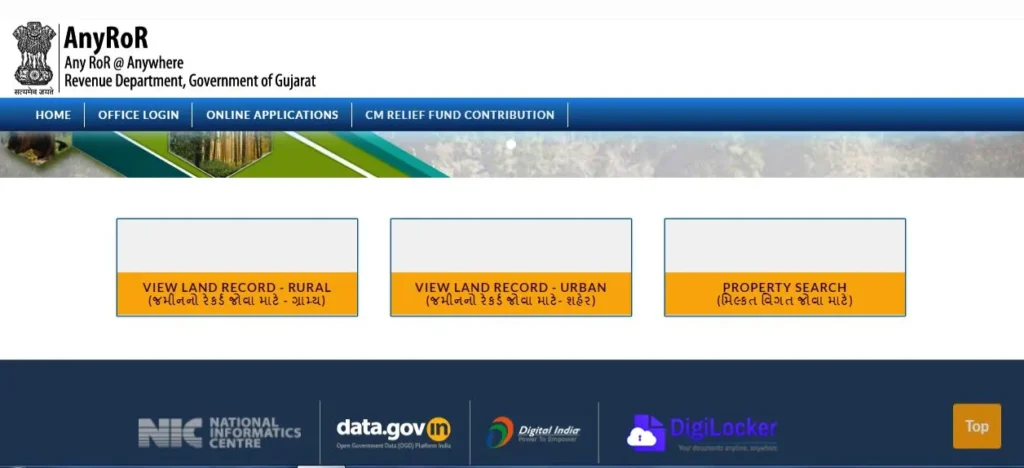
Land Record Types & Their Purpose
| Land Record Type | Gujarati Term | Purpose / Use Case |
|---|---|---|
| 7/12 Utara | સાત બાર ઉતારો | Combined ownership + cultivation + loan details |
| VF-6 | એન્ટ્રી વિગત | Mutation entry: Change in ownership due to sale/inheritance |
| VF-7 | સર્વે નંબર વિગતો | Survey number-wise land details (includes owner name, land class) |
| VF-8A | ખાતા વિગતો | Account number-wise summary (Khata No., owner’s holdings) |
| 135-D Notice | 135-ડિ નોટિસ | Public notice issued before mutation is finalized |
| Property Card | મિલ્કત કાર્ડ | Urban property details (plot boundaries, ward, etc.) |
| Digitally Signed RoR | ડિજિટલી સાઇન્ડ ગામ નમૂના | Legally valid for bank loan, registry, legal purposes |
| e-Chavdi | ઈ-ચાવડી | Village-level land maps, entries, and administrative records |
| Revenue Case Details | આવક કેસ વિગત | Info on any revenue/legal dispute or case history |
| Old Record Scans | જુના રેકોર્ડ સ્કૅન | Archived record PDFs for legacy verification |
Types of Land Records Available at AnyRoR
1: Rural Land Record:
- e-Chavdi (ઈ-ચાવડી)
- Know Closed Survey No. Detail (બીનખેતી હુકમથી બંધ થયેલ સરવે નંબરની વિગતો જાણવા)
- Old Scanned VF-7/12 Details (જૂના સ્કેન કરેલ ગામ નમૂના નં. ૭/૧૨ ની વિગતો)
- Old Scanned VF-6 Entry Details (જૂના સ્કેન કરેલ હક્ક પત્રક ગામ નમૂના નં. ૬ ની વિગતો)
- VF-7 Survey No. Details (ગામ નમૂના નં. ૭ ની વિગતો)
- VF-8A Khata Details (ગામ નમૂના નં. ૮અ ની વિગતો)
- VF-6 Entry Details (હક્ક પત્રક ગામ નમૂના નં. ૬ ની વિગતો)
- 135-D Notice for Mutation (હક્ક પત્રક ફેરફાર માટે ૧૩૫-ડી નોટીસ)
- New Survey No. from Old for Promulgated Village (પ્રમોલગેશન થયેલ ગામ માટે જુના સરવે નંબર પરથી નવો સરવે નંબર)
- Entry List By Month-Year (વર્ષ અને મહિના મુજબ નોંધોની વિગત)
- Integrated Survey No. Details (સરવે નંબરને લગતી સંપૂર્ણ માહિતી)
- Revenue Case Details (જમીન રેકર્ડ ને લગતા કેસની વિગત)
- Know Khata By Owner Name (ખાતેદારના નામ પરથી ખાતુ જાણવા)
- Know Survey No. Detail by UPIN (UPIN પરથી સરવે નંબરની વિગત જાણવા)
- Know Owner Details in Other Language (ખાતેદારની વિગતો અન્ય ભાષામાં જાણવા)
2: Urban Land Record:
- Survey No. Details (સરવે નંબરની વિગતો)
- Nondh No. Details (નોંધ નંબરની વિગત)
- 135D Notice Details (૧૩૫ડી નોટિસની વિગત)
- Know Survey No. By Owner Name (ધારણકર્તાના નામ પરથી સરવે નંબર જાણવા)
- Entry List By Month-Year (વર્ષ અને મહિના મુજબ નોંધોની વિગત)
- Know Survey No. Detail by UPIN (UPIN પરથી સરવે નંબરની વિગત જાણવા)
3: Property Search:
- Property Wise
- Name Wise
- By Document No. or Document Year
- By Date of Registration
- Download Scan Document
4: Digitally Signed RoR Download (Requires Login):
- Old Village Form No.6 (જૂના ગામ નમૂના નં. ૬)
- Village Form No.6 (ગામ નમૂના નં. ૬)
- Village Form No.7 (ગામ નમૂના નં. ૭)
- Village Form No. 8A (ગામ નમૂના નં. ૮અ)
- Village Form No.12 (ગામ નમૂના નં. ૧૨)
5: Digitally Sealed Property Card Copy:
- New Application (અરજી દાખલ કરવા)
- Print Submitted Application (દાખલ કરેલ અરજીની પ્રિન્ટ કરવા)
How to View Rural Land Records
Follow these steps to check rural land details on the Gujarat Revenue Department’s website:
- Visit the official portal.
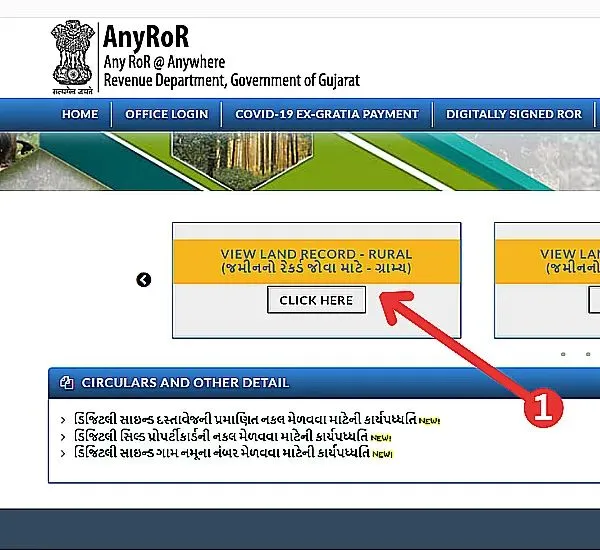
- From the homepage, click “View Land Record – Rural.
- On the next page, choose “REVENUE CASE DETAILS.
- Select your District, Taluka, Village, and Survey/Block Number in the correct sequence.
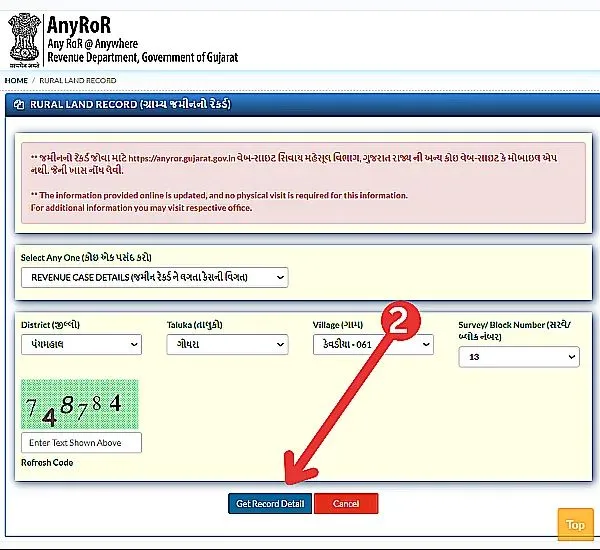
- Enter the Captcha Code and click “Get Record Detail.
You will now be able to view and download the rural land record details.
How to Check Urban Land Records
To view urban property records, follow these steps:
- Visit the official website: https://anyror.gujarat.gov.in/.
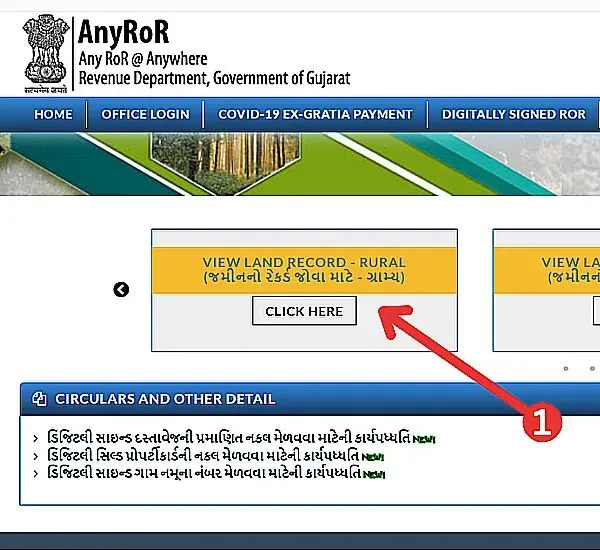
- Choose “Property Card (Original Card)” or “Unit Property Card.
- Property Card (Original) – For standalone properties like plots or houses.
- Unit Property Card – For flats, shops, or units within a larger complex.
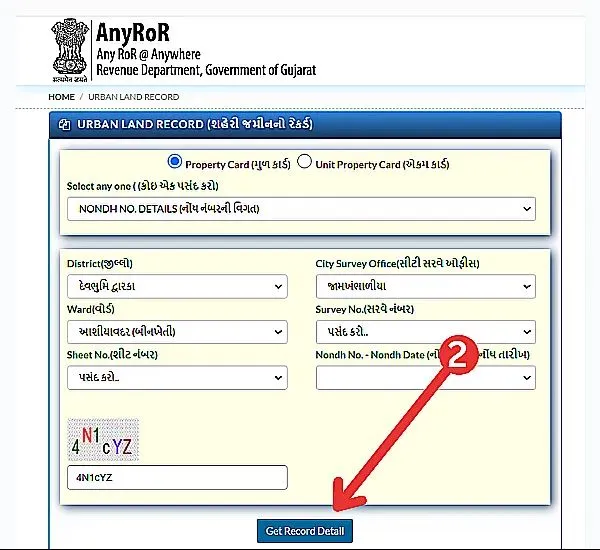
- Select your District and City Survey Office.
- Enter the Captcha Code and click “Get Record Details.”
The system will display details such as survey numbers, note numbers, and ownership information for the chosen property.
Viewing e-CHAVDI (ઈ-ચાવડી) Rural Land Records
To check e-CHAVDI Reports:
- Go to https://anyror.gujarat.gov.in/.
- On the homepage, click on e-CHAVDI (ઈ-ચાવડી).
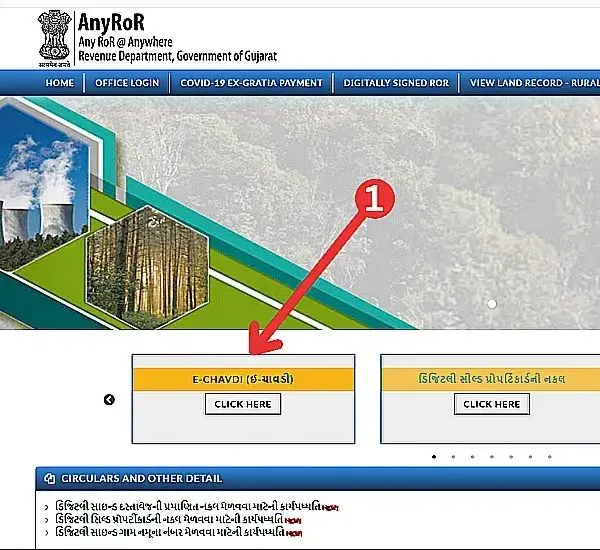
- Select the following details:
- District (જીલ્લો)
- Taluka (તાલુકો)
- Village (ગામ)
- Year (વર્ષ)
- Enter the Captcha Code and click “Get Records Detail.”
You can now access and download the e-CHAVDI rural land records for the specified year and location.
How to Apply for & Print a Digitally Sealed Property Card
To apply or print your Digitally Sealed Property Card, follow these steps:
- Visit the official site: https://anyror.gujarat.gov.in/.
- Click on “Digitally Sealed Property Card Copy (ડિજિતલી સીલ્ડ પ્રોપર્ટિકાર્ડની નકલ).”
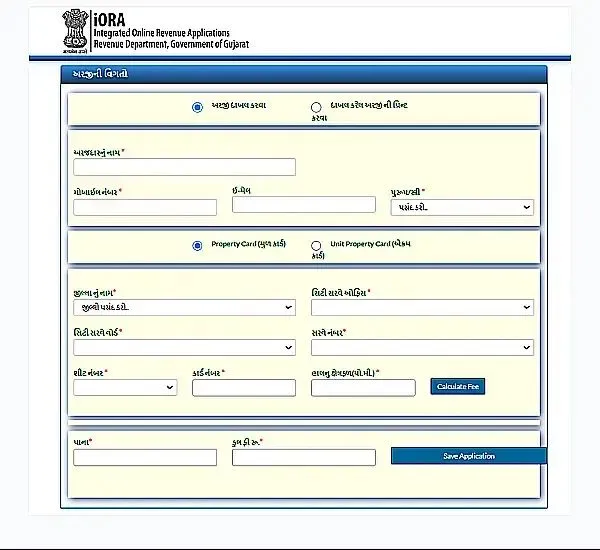
- On the new page, choose one of the following options:
- Apply for Property Transfer
- Print Application
- To apply for property transfer, enter:
- Applicant’s Name, Mobile Number, Email ID
- Property Type (Original/Unit Card)
- District, City Survey Office, Ward, Survey Number, Sheet Number, Card Number, and Area (sq. m.)
- Click “Save Application.
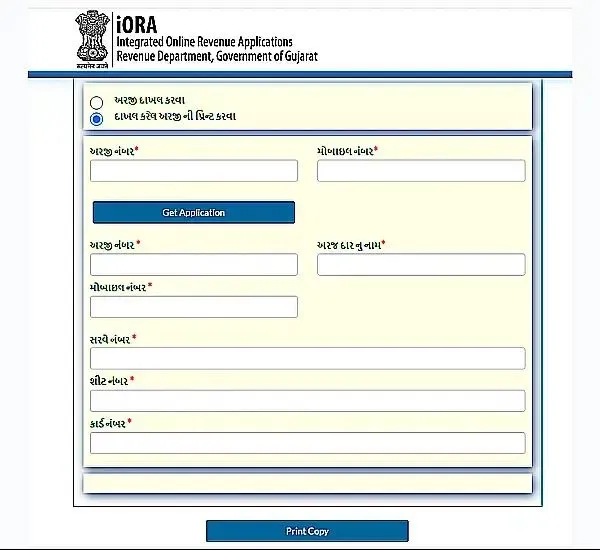
To print your Property Card, select “Print Application”, enter your Application Number, and click “Print Copy.
Process for Digitally Signed RoR (Record of Rights) Login
To access Digitally Signed RoR, follow these steps:
- Visit https://anyror.gujarat.gov.in/.
- Select Digitally Signed RoR / ડિજિટલી સાઇન્ડ ગામ નમૂના નંબર.”
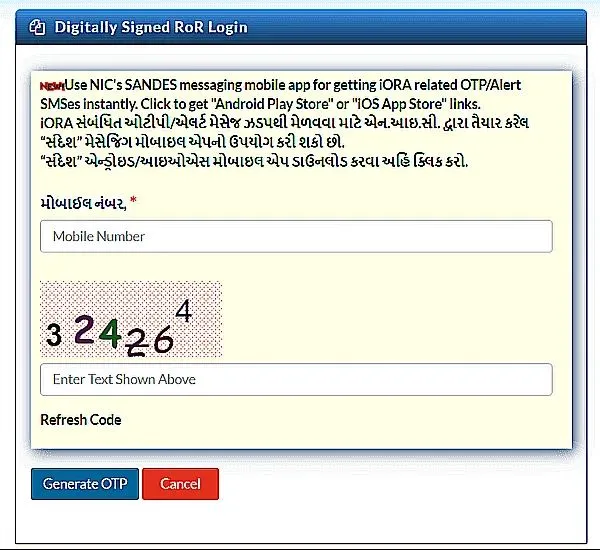
- Enter your Mobile Number and Captcha Code, then click “Generate OTP.”
- Enter the OTP received on your mobile to log in and view your Digitally Signed RoR.
How to PROPERTY SEARCH
Step 1 – Choose a Search Option and Provide Property Information
To begin, you’ll need to decide how you want to look up your property. The portal allows you to search using three different methods, and you can pick the one that best matches the details you already have:
- By Property Details
- By Owner’s Name
- By Document Number and Year
Once you select a method, choose the District, Sub-Registrar Office, and Village where the property is located. The system will then prompt you to fill in information based on the search option you selected.
Next, enter your personal details such as your name, mobile number, and email address for verification purposes. An OTP will be sent to your mobile number—enter that code and click on “Get Record Detail” to proceed.
Step 2 – Check Your Land/Property Information
After completing the previous step, the system will display all available details related to your property on the screen. Here, you’ll be able to review important information such as ownership records, land specifications, and other relevant property data.
These details can serve as proof of ownership and may also be used as supporting documents when you plan to sell or transfer the property.
Q1. What is AnyRoR Gujarat used for?
It is used to check rural and urban land records online, including anyror 7/12 Utara, 8A Khata, and Property Cards.
Q2. How can I get anyror gujarat 7/12 Utara online?
Visit anyror.gujarat.gov.in, select rural land record, enter details, and download.
Q3. Is the online 7/12 Utara valid for bank loans?
Yes, the digitally signed PDF is valid for loans and legal purposes.
Q4. Can I print 7/12 ની નકલ online in Gujarati?
Yes, the portal provides online print in Gujarati language also.
Q5. Is AnyRoR@Anywhere free?
Yes, checking land records is completely free of cost.